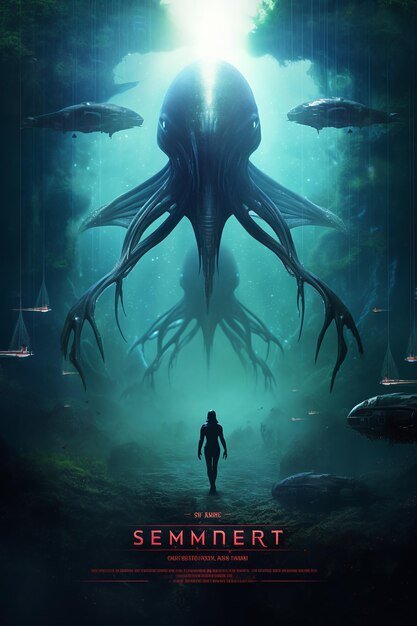
Forget the days of needing a hefty design budget or years of Photoshop mastery to create a truly professional movie poster. Today, thanks to a revolution in artificial intelligence, captivating cinematic visuals are within reach for anyone with a compelling vision and a knack for words. Crafting stunning posters using AI isn't just about clicking a button; it's about understanding the "why" and "how" behind effective visual storytelling and applying specific AI movie poster design techniques to achieve that studio-grade look.
This guide will demystify the process, transforming you from a curious beginner to a confident creator, capable of generating eye-catching artwork that perfectly encapsulates your film's essence. Whether you're a filmmaker on a shoestring budget, a marketing professional looking for rapid iterations, or simply a creative mind eager to explore new artistic frontiers, AI is your most powerful new collaborator.
At a Glance: What You'll Learn
- Genre-Specific Visual Cues: How to tailor your poster's style to thrillers, sci-fi, comedy, drama, and action.
- Core Poster Elements: The key components of any compelling movie poster, from central imagery to color and typography.
- The AI Design Workflow: A step-by-step process for crafting effective prompts, generating images, and refining your results.
- Advanced Prompt Engineering: Techniques to achieve precise control over camera angles, lighting, and artistic influences.
- Maximizing AI Benefits: How to leverage AI for speed, customization, and uniqueness, while understanding its limitations.
- Human-AI Collaboration: The secret to truly outstanding posters lies in combining AI's efficiency with your creative intuition.
The New Frontier: Democratizing Cinematic Design
For decades, the movie poster was a revered art form, a critical piece of a film's marketing puzzle, often costing thousands and taking weeks of work by seasoned graphic designers and illustrators. It was a gatekeeper, accessible only to those with significant resources. AI has shattered that gate, empowering independent filmmakers, marketing teams, students, and even enthusiasts to produce high-quality, professional-looking posters in a fraction of the time and at a fraction of the cost.
This isn't about replacing human creativity; it's about amplifying it. AI tools take your textual descriptions – your vision – and translate them into stunning visual realities, rapidly iterating through concepts until you find the perfect one. It turns the complex into the accessible, allowing you to focus on the storytelling rather than the technical intricacies of design software.
Decoding Cinematic Style: Genres and Their Visual DNA
Before you even think about typing a prompt, you need to understand the visual language of your film's genre. A great movie poster doesn't just show an image; it tells a story, sets a tone, and primes the audience for the experience they're about to have. Each genre has its own distinct visual cues that AI can masterfully recreate, provided you guide it correctly.
Thriller & Horror: Shadows, Suspense, and Shock
For genres designed to evoke unease or fear, your poster should reflect that intensity. Think about creating a sense of dread or mystery.
- Visuals: Embrace darkness, high contrast lighting, and stark silhouettes. A mysterious figure lurking in the shadows, an isolated cabin, or a haunting, featureless landscape are strong choices.
- Color Palette: Limit your colors. Grays, deep blues, and blacks create a foreboding atmosphere. Introduce shocking accents like a blood-red splash or a piercing yellow eye to highlight danger.
- Environment: Foggy, misty, or rain-swept settings enhance atmosphere. Sharp, menacing objects (knives, broken glass) can be subtle yet effective.
- Expressions: Fearful, wide-eyed expressions or obscured faces build suspense.
Science Fiction (Sci-Fi): The Unknown and the Future
Sci-fi posters transport viewers to other worlds or alternate realities. They should spark curiosity about technology, space, and what lies beyond our current understanding.
- Visuals: Focus on grandeur and scale. Sprawling galaxies, sleek, futuristic spaceships, glowing neon cities, and alien, otherworldly landscapes are staples.
- Styles: Specific subgenres like "Cyberpunk" (dystopian, high-tech, low-life) or "Techno Futuristic" (clean, advanced, often utopian) offer rich visual palettes.
- Elements: Holographic interfaces, advanced weaponry, and mysterious structures. A lone figure against an immense cosmic backdrop often works well.
Comedy: Brightness, Energy, and Exaggeration
Comedy posters need to signal fun, lightness, and often, a touch of absurdity.
- Visuals: Opt for bright, energetic scenes. Exaggerated facial expressions, slapstick moments, or characters in awkward predicaments immediately convey humor.
- Color Palette: Vibrant colors and playful, eye-catching schemes are key. Avoid muted tones unless it's a dark comedy.
- Typography (Conceptual): While AI focuses on images, imagine the final text using bubbly, quirky, or informal fonts to match the lighthearted mood.
Drama & Romance: Emotion, Intimacy, and Symbolism
These genres thrive on emotional connection and human stories. Your poster should evoke feelings, often through character focus and nuanced visuals.
- Visuals: Emphasize emotion with close-up character shots, allowing their expressions to tell a story. Symbolic imagery (e.g., a wilting flower, intertwined hands) can represent deeper themes.
- Lighting: Soft, natural lighting creates intimacy and warmth. Backlighting can add a dreamy or melancholic feel.
- Styles: "Vintage" or "Artistic" styles can add a timeless or sophisticated touch, lending gravitas to the emotional core.
Action & Adventure: Dynamic Poses, Epic Scales, and Conflict
Action posters demand dynamism and a sense of impending excitement. They promise thrills and large-scale spectacle.
- Visuals: Feature dynamic poses, characters mid-action, or scenes involving explosions and high-octane sequences.
- Environment: Epic landscapes – towering mountains, vast deserts, futuristic cityscapes under siege – provide a grand backdrop for adventure.
- Central Figure: A central hero, ready for battle or in a heroic stance, often serves as the focal point, embodying strength and determination.
Crafting Your Vision: Essential Elements of a Compelling Poster
Regardless of genre, certain core components elevate a simple image to a truly compelling movie poster. When designing your prompts, consider how each of these elements will contribute to the overall impact.
- Central Image: This is the primary visual hook. Be incredibly specific in your description. Is it a character? An object? A pivotal scene? What are they doing? What's their expression? The more detail, the better AI can interpret your intent.
- Color Palette: Colors are mood setters. Blue can signify calm, sadness, or coldness. Yellow might suggest happiness, warmth, or unsettling caution. Red is passion, danger, or urgency. Explicitly describe your desired color scheme (e.g., "monochromatic blues," "fiery oranges and reds," "vibrant neon").
- Typography (Conceptual): While AI primarily generates images, thinking about the text style before you prompt can influence your image composition. A jagged, distressed font for horror might require more negative space or a darker background, while an elegant serif for drama might need a cleaner, softer area. Design your image with the idea of text in mind.
- Tagline and Title: These are crucial for marketing, but AI doesn't generate them (yet!). Plan for their integration. Ensure your generated image has sufficient "negative space" – clear areas where text can be added without obscuring critical visual information. This foresight saves significant editing time later.
Your AI Design Toolkit: The Step-by-Step Process
Ready to start generating? The process is remarkably straightforward, but mastery comes from understanding how to guide the AI effectively.
1. The Art of the Prompt: Speaking AI's Language
This is where your vision truly takes shape. The quality of your prompt directly correlates to the quality of the AI output. Think of your prompt as a director's instructions to a highly skilled, but literal, visual artist.
The most effective prompts often follow a simple formula:[Subject] + [Action/Setting] + [Art Style] + [Mood/Lighting]
Let's break it down:
- Subject: Who or what is the main focus? (e.g., "A lone astronaut," "A vintage detective," "Two hands reaching across a chasm.")
- Action/Setting: What are they doing, and where are they doing it? (e.g., "gazes at a swirling blue nebula," "walks down a rain-slicked alley at night," "against a backdrop of a crumbling cityscape.")
- Art Style: How do you want it to look? This is crucial for cinematic flair. (e.g., "Cinematic," "Epic," "Minimalist," "Photorealistic," "Hand-drawn," "Cyberpunk," "Vintage sci-fi," "Film noir.")
- Mood/Lighting: What emotional tone and lighting conditions define the scene? (e.g., "dramatic lighting," "soft evening glow," "harsh neon glow," "ominous shadows.")
Example in Action:
Instead of a vague prompt like, "A movie poster for a sci-fi film," aim for specificity:
"A lone astronaut in a reflective helmet gazes at a swirling blue nebula. Planet Earth is a small marble in the distance. Cinematic, epic lighting, minimalist style. Movie poster."
This detailed prompt gives the AI ample information to create a focused, high-impact image.
2. Navigating Style & Dimension Choices
Most AI movie poster generators offer pre-set styles and aspect ratio choices.
- Style Selection: Experiment with different stylistic options provided by the tool (e.g., "Photorealistic," "Digital Art," "Comic Book," "Abstract"). Pair these with your genre. "Cyberpunk" or "Techno Futuristic" are excellent starting points for sci-fi, while "Vintage" or "Artistic" can add depth to drama.
- Dimensions: Choose standard print sizes like A4, A3, or poster aspect ratios (e.g., 2:3, 9:16) for physical prints. For social media, select square (1:1) or wide (16:9) formats. Matching dimensions to your intended use ensures your poster looks great everywhere.
3. Refining Your AI-Generated Masterpiece
Rarely will your first AI output be perfect. Treat the initial generations as a starting point.
- Iterate: If the result isn't quite right, tweak your prompt. Change a keyword, add more detail, adjust the lighting description, or try a different art style. Generate multiple variants to explore different interpretations of your prompt.
- Focus on Detail: Pay attention to small elements. Does the character's expression match the mood? Are the background elements cohesive? Sometimes, a minor adjustment in the prompt can significantly improve the overall image.
4. The Final Polish: Integrating Text, Logos, and Branding
Once you've settled on the perfect AI-generated image, it's time for the final touches. AI focuses on the visual, so text integration is usually a manual step.
- Download High-Resolution: Ensure you download the highest resolution available.
- Use Image Editing Software: Tools like Adobe Photoshop, GIMP (free), Canva, or even basic online editors are suitable.
- Add Title & Tagline: Place your film's title and tagline strategically, utilizing the negative space you planned for. Experiment with fonts that align with your genre and poster's mood.
- Credits & Logos: Include production company logos, distributor logos, and key cast/crew credits if desired, typically at the bottom of the poster.
- Consider our AI movie poster generator for a streamlined process, designed to give you robust images ready for these final touches.
Elevating Your Game: Advanced AI Design Techniques
To truly stand out, push beyond basic prompts. These advanced techniques offer greater control and artistic nuance.
Prompt Engineering: Micro-Managing the Visuals
This involves adding very specific artistic and technical details to your prompts, much like a film director instructing a cinematographer.
- Specify Camera Angles:
- "Low-angle shot of a towering skyscraper": Makes the subject appear powerful or dominant.
- "Wide shot of a barren desert at sunset": Establishes a vast, isolated setting.
- "Extreme close-up on a character's tear-filled eye": Intensifies emotion and intimacy.
- Describe Lighting:
- "Dramatic chiaroscuro lighting": High contrast, emphasizing light and shadow for a theatrical, mysterious feel.
- "Soft morning light filtering through forest canopy": Creates a gentle, ethereal, or hopeful mood.
- "Harsh neon glow from city signs reflecting on wet streets": Perfect for cyberpunk or gritty urban settings.
- Reference Artistic Influences:
- "In the style of Saul Bass": Evokes iconic, minimalist graphic design with bold shapes and limited color palettes.
- "Reminiscent of Drew Struzan's work": Suggests photorealistic painted illustrations often seen on classic adventure films.
- "With influences from Renaissance paintings": Adds a classical, dramatic, and often chiaroscuro feel.
Multi-Image Fusion: Blending Realism with AI Creativity
Some advanced AI tools, like Reelmind.ai, offer capabilities beyond simple text-to-image. They can merge existing images with AI-generated backgrounds.
- Use Case: Imagine you have a striking headshot of your lead actor. You can feed this into the AI and prompt it to place them seamlessly into an "alien jungle at dusk" or "the cockpit of a futuristic fighter jet."
- Technique: These tools often use "edge-aware blending" to integrate the source image into the AI-generated environment, ensuring natural transitions and consistent lighting. This allows for hyper-realistic results by combining actual photography with boundless AI imagination.
AI Suggestions: Smart Layouts and Fonts
Some sophisticated platforms go a step further, offering AI-powered suggestions for fonts and layouts that align with your chosen genre and image. While you still handle the final text integration, these suggestions can kickstart your design process, ensuring your typography complements your AI-generated visuals.
Why AI is Non-Negotiable: Benefits & Best Practices
In today's fast-paced, visually driven world, AI isn't just a novelty; it's a strategic advantage for film marketing.
Unprecedented Time Efficiency
What once took weeks of design and review cycles can now be accomplished in hours. AI allows for rapid iteration, generating dozens of poster variants in under 30 minutes. This speed means you can explore more creative directions, test different visual hypotheses, and react quickly to feedback, getting to the perfect poster faster than ever before.
Customization at Scale
AI empowers you to tailor posters for diverse audiences or specific marketing campaigns. Need a darker, more intense version for a niche horror festival? Or a softer, more romantic take for a broader release? AI can achieve theme-switching with a few prompt adjustments, delivering highly customized visuals without starting from scratch.
Automated Localization
For films with international reach, AI can even assist with localization. While text is added separately, the AI can be prompted to adjust symbols, cultural references, or visual motifs to resonate better with specific international markets, ensuring your poster speaks effectively to a global audience.
Uniqueness: Avoiding the Generic Trap
The key to preventing your AI poster from looking "generic" is highly detailed and specific prompting. Think about unique character traits, unusual settings, or unexpected juxtapositions. Experiment with combinations of styles and influences. Instead of "a robot," try "a rusted, bipedal robot with glowing red eyes, wandering a derelict spaceship graveyard." Specificity breeds uniqueness.
Reduced Infringement Risk
Concerns about copyright and ethical AI art are valid. Many reputable AI art tools, particularly those aimed at professional use (like Reelmind.ai mentioned in our ground truth), are trained on licensed datasets or allow for custom model training on original artwork. This helps mitigate infringement risks, offering peace of mind to creators. Always choose tools that are transparent about their data sources.
Human-AI Collaboration: The Ultimate Partnership
The most impactful movie posters don't come solely from AI or solely from human effort; they emerge from a powerful collaboration. AI provides the efficiency and boundless creative generation, acting as a tireless digital artist. Your role is that of the discerning director, the creative visionary who crafts the prompt, curates the best output, and applies the final human touch, integrating text and refining details to ensure the poster perfectly captures the soul of the film.
Common Questions & Misconceptions About AI Movie Poster Design
Let's clear up some common thoughts you might have.
Is AI only for professional graphic designers?
Absolutely not. AI design tools are specifically built to democratize design. They eliminate the need for advanced software skills, making professional-quality poster creation accessible to anyone with a clear vision and the ability to describe it in text.
How do I make my AI posters unique and not generic?
The secret lies in the specificity and creativity of your prompts. Avoid broad terms. Layer details, combine unexpected elements, reference niche art styles, and describe emotional tones. Experiment with negative space, unusual camera angles, and distinct color palettes. The more unique your input, the more distinctive the output.
Can AI truly replace human movie poster designers?
Not entirely. While AI can handle the visual generation with incredible speed and skill, the ultimate vision, artistic direction, nuanced emotional understanding, and strategic marketing decisions still require human creativity and judgment. AI is a powerful tool and collaborator, not a replacement for the human mind behind the concept.
What about copyright and intellectual property when using AI?
This is a developing area, but generally, if you are using AI tools trained on licensed or public domain data, the outputs are often yours to use commercially. However, it's crucial to review the terms of service of the specific AI generator you use. Tools that allow you to train models on your own original artwork offer the clearest path to ownership.
Your Next Step: Mastering the Art of AI Movie Poster Design
The landscape of film marketing has changed forever. AI movie poster design techniques are no longer a futuristic concept but a present-day necessity for anyone looking to create compelling visual narratives that cut through the noise. You now have the knowledge to approach this powerful technology with confidence, turning your abstract ideas into concrete, stunning works of art.
Start experimenting. Don't be afraid to try outlandish prompts, to combine genres, or to lean into highly specific visual details. The more you play, the more you learn what works, and the more refined your results will become. Embrace AI not as a shortcut, but as an extension of your creative power, allowing you to bring your cinematic dreams to life, one pixel-perfect poster at a time. The next great movie poster could very well be one you create with a little help from AI.